AI medical scribeผู้ช่วยจดเวชระเบียนด้วย AI

MediDesc

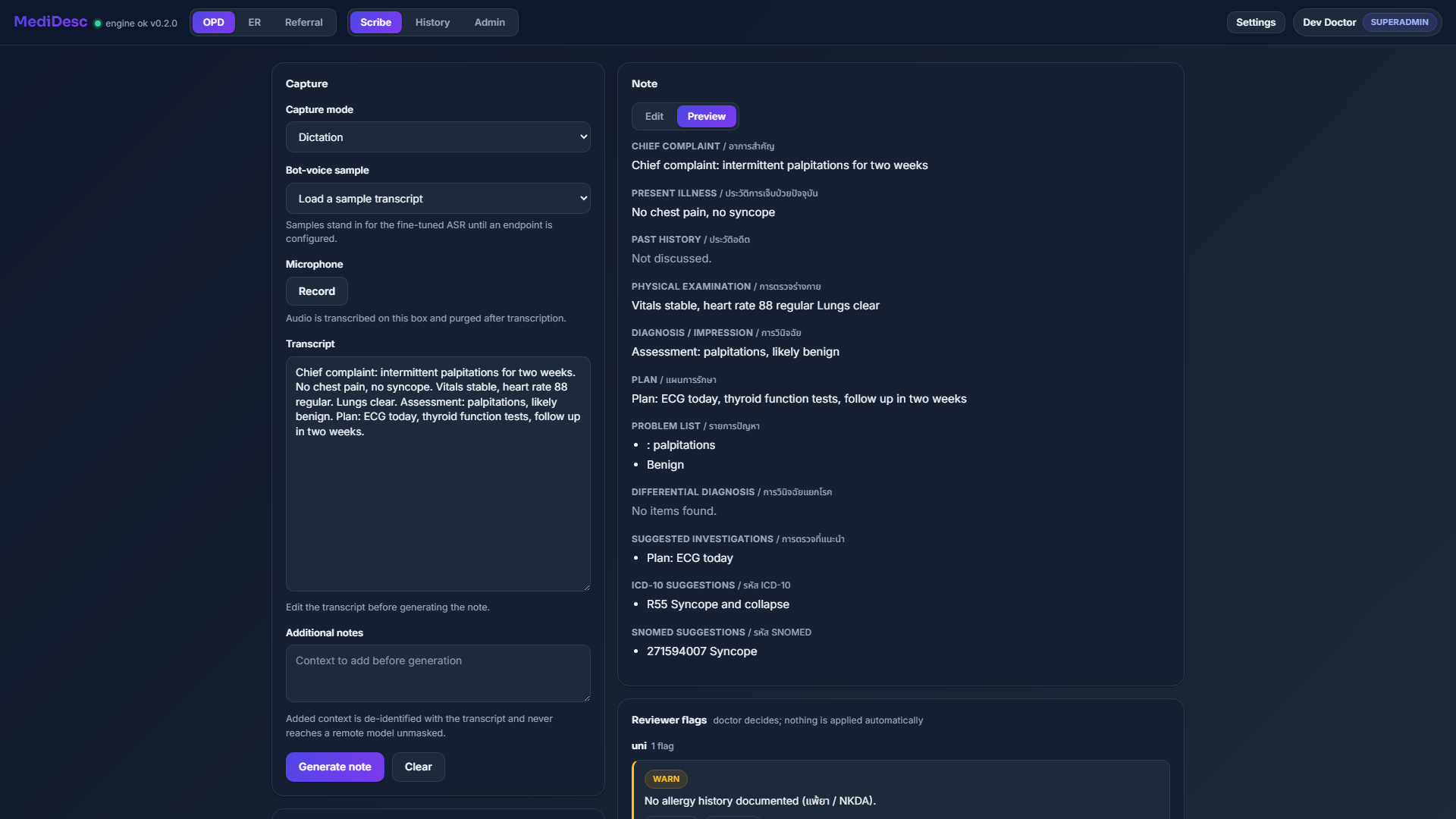
Record an encounter and get a structured draft note you edit and own. MediDesc transcribes the conversation and drafts the note; you review every line, then sign and keep it.

บันทึกการตรวจแล้วได้ร่างโน้ตที่มีโครงสร้างซึ่งคุณแก้ไขและเป็นเจ้าของเอง MediDesc ถอดเสียงบทสนทนาแล้วร่างโน้ตให้ คุณตรวจทานทุกบรรทัด แล้วเซ็นและเก็บไว้

Record the visit, review, edit, and own the note yourself.

บันทึกการตรวจแล้วได้ร่างโน้ตที่มีโครงสร้าง คุณตรวจทาน แก้ไข และเป็นเจ้าของโน้ตเอง

MediDesc AI medical scribe: record an encounter, get a structured draft note with PDPA masking you edit and own

What MediDesc doesMediDesc ทำอะไรได้บ้าง

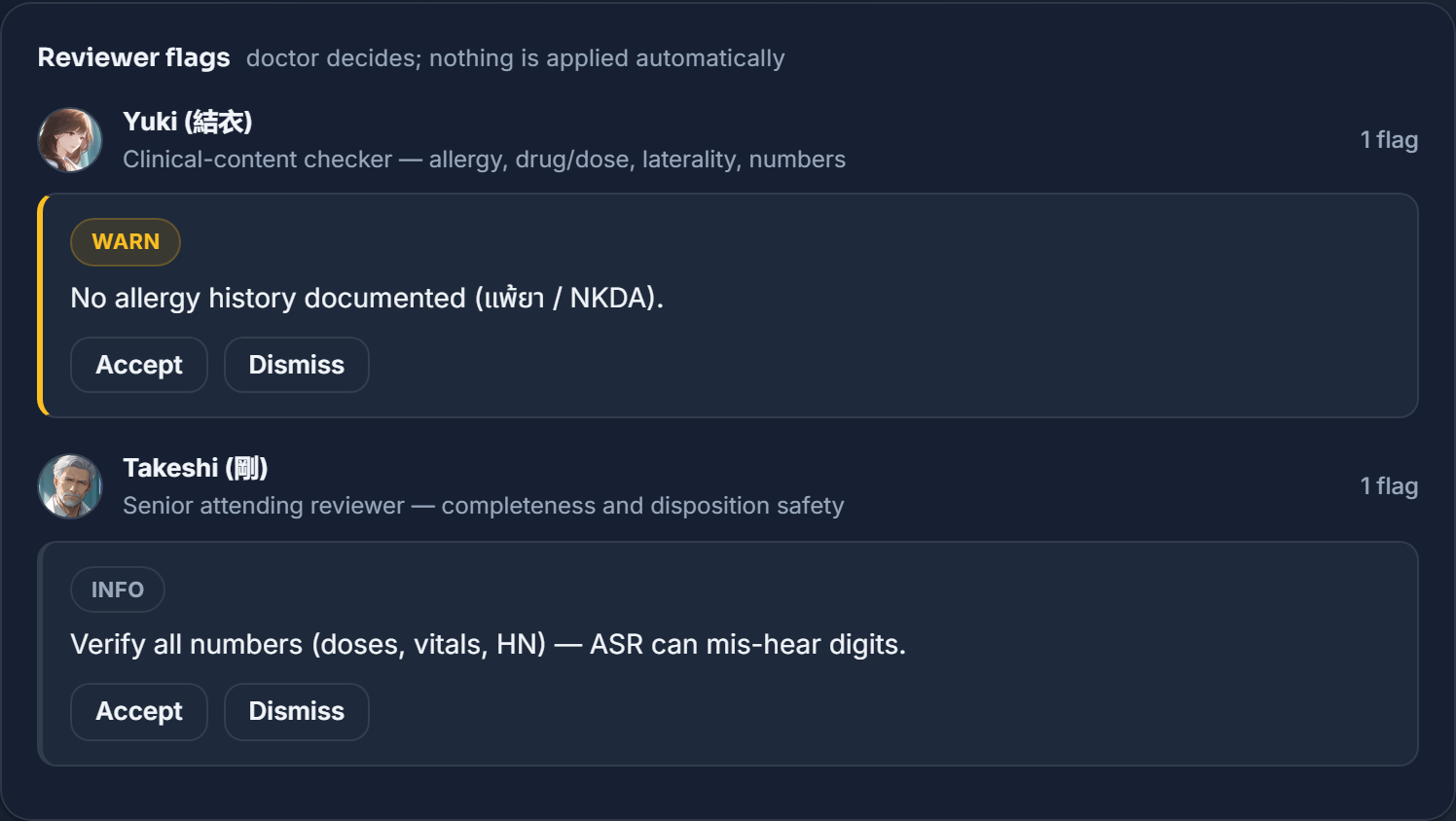
Record, transcribe, and draft a structured note, with the patient’s data masked before any remote model ever sees it.

บันทึกเสียง ถอดเสียง แล้วร่างโน้ตที่มีโครงสร้าง โดยข้อมูลผู้ป่วยถูกปิดบังก่อนที่โมเดลระยะไกลจะเห็นเสมอ

Record or dictate · OPD · ER · Referralบันทึกเสียงหรือพูดบอก · OPD · ER · Referral

Capture the encounter by voice in the OPD, ER, or Referral room. Each room carries its own note template, so the draft comes back shaped for that setting.

บันทึกการตรวจด้วยเสียงในห้อง OPD, ER หรือ Referral แต่ละห้องมีเทมเพลตโน้ตของตัวเอง ร่างที่ได้จึงมีรูปแบบเหมาะกับงานนั้น

Cloud transcriptionถอดเสียงบนคลาวด์

Turn the recording into text with OpenAI Whisper or AssemblyAI, using your own key. The audio goes to the provider you chose, and is purged right after transcription, never stored.

แปลงเสียงที่บันทึกเป็นข้อความด้วย OpenAI Whisper หรือ AssemblyAI โดยใช้คีย์ของคุณเอง เสียงจะถูกส่งไปยังผู้ให้บริการที่คุณเลือก และถูกลบทิ้งทันทีหลังถอดเสียงเสร็จ ไม่มีการเก็บไว้

DeepSeek structured notesโน้ตมีโครงสร้างด้วย DeepSeek

DeepSeek drafts a sectioned note from the transcript. deepseek-chat runs by default, with a deeper, slower deepseek-reasoner option you can pick per note.

DeepSeek ร่างโน้ตแบบแบ่งหัวข้อจากข้อความที่ถอดเสียง โดยค่าเริ่มต้นใช้ deepseek-chat และมีตัวเลือก deepseek-reasoner ที่ลึกกว่าแต่ช้ากว่า เลือกได้เป็นรายโน้ต

PDPA masking, always onปิดบังข้อมูลตาม PDPA เปิดตลอด

Before any remote model sees the text, patient identifiers are masked. Masking is forced for every remote call and cannot be switched off.

ก่อนที่โมเดลระยะไกลจะเห็นข้อความ ตัวระบุตัวตนของผู้ป่วยจะถูกปิดบัง การปิดบังถูกบังคับสำหรับทุกการเรียกระยะไกล และปิดไม่ได้

Bring your own keysใช้คีย์ของคุณเอง

Save your own DeepSeek, OpenAI, or AssemblyAI keys. They are encrypted at rest, and only a masked hint, such as sk-...ab12, is ever shown back.

เก็บคีย์ DeepSeek, OpenAI หรือ AssemblyAI ของคุณเอง คีย์จะถูกเข้ารหัสเมื่อจัดเก็บ และแสดงกลับเพียงบางส่วน เช่น sk-...ab12 เท่านั้น

Your notes stay yoursโน้ตของคุณยังเป็นของคุณ

Each doctor sees only their own session history: time, room, encounter, and status. Opening a note is recorded in the audit log.

แพทย์แต่ละคนเห็นเฉพาะประวัติเซสชันของตัวเอง: เวลา ห้อง การตรวจ และสถานะ การเปิดโน้ตจะถูกบันทึกไว้ในบันทึกการตรวจสอบ

Installable appติดตั้งเป็นแอปได้

MediDesc installs like an app and works in the estate dark theme, with a Light, Dark, or Auto toggle. Fonts are self-hosted, so nothing loads from an outside CDN.

MediDesc ติดตั้งได้เหมือนแอป และใช้งานในธีมมืดของเอสเตท พร้อมสลับโหมด Light, Dark หรือ Auto ฟอนต์โฮสต์เอง จึงไม่มีการโหลดจาก CDN ภายนอก

Thai and Englishไทยและอังกฤษ

The whole interface reads in Thai and English, matching however your clinic works.

ทั้งหน้าจอใช้ได้ทั้งภาษาไทยและอังกฤษ ปรับตามที่คลินิกของคุณทำงาน
Privacy is the productความเป็นส่วนตัวคือตัวผลิตภัณฑ์

Here is exactly what leaves the box, and what never does. Nothing about a patient reaches a remote model unmasked.

นี่คือสิ่งที่ออกจากเครื่องและสิ่งที่ไม่มีวันออก ข้อมูลผู้ป่วยจะถูกปิดบังก่อนส่งให้โมเดลระยะไกลเสมอ

  • Audio is never stored

    เสียงไม่ถูกเก็บไว้เลย

    The recording is transcribed, then purged. It is deleted in every path, whether transcription runs on the box or through a cloud provider.

    เสียงที่บันทึกจะถูกถอดเป็นข้อความแล้วลบทิ้ง มันถูกลบในทุกเส้นทาง ไม่ว่าจะถอดเสียงบนเครื่องหรือผ่านผู้ให้บริการคลาวด์

  • Masked before any remote model

    ปิดบังก่อนถึงโมเดลระยะไกลทุกครั้ง

    Every remote call, note generation or a remote reviewer, receives masked text only. Masking is forced and cannot be turned off for remote endpoints.

    ทุกการเรียกระยะไกล ไม่ว่าจะเป็นการสร้างโน้ตหรือผู้ตรวจทานระยะไกล จะได้รับเฉพาะข้อความที่ปิดบังแล้ว การปิดบังถูกบังคับและปิดไม่ได้สำหรับปลายทางระยะไกล

  • See the masked payload first

    ดูข้อมูลที่ปิดบังก่อนส่ง

    A Redaction card shows what a remote model would receive: counts of masked identifiers, and a Show masked text view of the exact payload, before anything is sent.

    การ์ด Redaction แสดงสิ่งที่โมเดลระยะไกลจะได้รับ: จำนวนตัวระบุตัวตนที่ปิดบัง และมุมมอง Show masked text ของข้อมูลจริง ก่อนที่จะส่งอะไรออกไป

  • Remote is labeled remote

    ระยะไกลถูกระบุว่าระยะไกล

    An endpoint marked LOCAL is host-verified, not trusted. If it is actually reachable from the public internet, it is promoted to REMOTE and masking stays forced.

    ปลายทางที่ระบุว่า LOCAL จะถูกตรวจสอบที่โฮสต์ ไม่ใช่เชื่อใจไปเอง ถ้าจริงๆ แล้วเข้าถึงได้จากอินเทอร์เน็ตสาธารณะ มันจะถูกยกระดับเป็น REMOTE และการปิดบังยังถูกบังคับอยู่

  • Keys encrypted, hint only

    คีย์ถูกเข้ารหัส แสดงแค่บางส่วน

    Your API keys are encrypted at rest in the MediDesc database. Only a masked hint is ever returned to the screen, never the plaintext key.

    คีย์ API ของคุณถูกเข้ารหัสเมื่อจัดเก็บในฐานข้อมูล MediDesc หน้าจอจะแสดงกลับเพียงบางส่วนของคีย์เท่านั้น ไม่เคยแสดงคีย์แบบข้อความจริง

  • Notes are per-user

    โน้ตแยกตามผู้ใช้

    You see only your own notes by default, and opening any note writes an audit entry. Only admin accounts can read across users.

    โดยค่าเริ่มต้นคุณเห็นเฉพาะโน้ตของตัวเอง และการเปิดโน้ตใดๆ จะเขียนรายการลงบันทึกการตรวจสอบ มีเพียงบัญชีแอดมินที่อ่านข้ามผู้ใช้ได้

  • An honest cloud notice

    แจ้งเตือนเรื่องคลาวด์อย่างตรงไปตรงมา

    When a cloud transcription backend is active, the app says so in plain words: audio is sent to your chosen provider for transcription.

    เมื่อใช้แบ็กเอนด์ถอดเสียงบนคลาวด์ แอปจะบอกตรงๆ ว่า: เสียงจะถูกส่งไปยังผู้ให้บริการที่คุณเลือกเพื่อถอดเสียง

How it worksใช้งานยังไง

  1. 1

    Record the encounter

    บันทึกการตรวจ

  2. 2

    Transcribe the audio

    ถอดเสียงเป็นข้อความ

  3. 3

    A structured note you edit and own

    ร่างโน้ตที่คุณแก้และเป็นเจ้าของ

Where the AI comes fromAI มาจากไหน

Draft notes with platform DeepSeek, or plug in your own provider keys, kept encrypted and shown back only as a masked hint.

ร่างโน้ตด้วย DeepSeek ของแพลตฟอร์ม หรือเสียบคีย์ของคุณเองที่เก็บแบบเข้ารหัสและแสดงกลับเพียงบางส่วนของคีย์

Platform AIAI ของแพลตฟอร์ม

Platform-funded DeepSeek note-drafting is included for signed-in members.

การร่างโน้ตด้วย DeepSeek ที่แพลตฟอร์มออกค่าใช้จ่ายให้ รวมอยู่ในบัญชีสมาชิกที่ล็อกอิน

Your own key already works, right now.

คีย์ของคุณเองใช้ได้แล้ววันนี้

Your own keysคีย์ของคุณเอง

Save your own DeepSeek, OpenAI, or AssemblyAI keys. They are encrypted at rest, shown only as a masked hint, and open to every signed-in user.

เก็บคีย์ DeepSeek, OpenAI หรือ AssemblyAI ของคุณเอง เข้ารหัสเก็บไว้ และแสดงกลับเพียงบางส่วนของคีย์ ใช้ได้กับผู้ล็อกอินทุกคน

Doctors sign in with their uniqcret.com account. The same login works across every *.uniqcret.com site, so there is no separate MediDesc account or password.

แพทย์ล็อกอินด้วยบัญชี uniqcret.com บัญชีเดียวใช้ได้ทุกเว็บ *.uniqcret.com จึงไม่มีบัญชีหรือรหัสผ่าน MediDesc แยกต่างหาก

Start your first noteเริ่มโน้ตแรกของคุณ

Open MediDesc to record an encounter, or see exactly how privacy works.

เปิด MediDesc เพื่อบันทึกการตรวจ หรือดูว่าความเป็นส่วนตัวทำงานยังไง

MediDesc · AI medical scribe · Uniqcret